TheFinQ.com is designed to be your one-stop destination for everything related to cards, loans, and investment products across India. We help you compare and choose the best financial products that suit your needs, including:

Aadhaar is one of the most important identity documents in India. It is used everywhere, from opening a bank account to getting a mobile SIM card. But carrying the physical Aadhaar card all the time can be risky. It may get lost, damaged, or stolen. The good news is that you don’t always need to carry the physical card because you can download a virtual Aadhaar for free!
The virtual Aadhaar, also known as e-Aadhaar, is a digital copy of your Aadhaar card. It is issued by the Unique Identification Authority of India (UIDAI) and is just as valid as the physical Aadhaar card. Let’s explore how you can download your virtual Aadhaar quickly and easily.
Virtual Aadhaar is a soft copy of your Aadhaar card, available in a PDF format. It contains the same details as your physical Aadhaar, including your name, photograph, Aadhaar number, and other information. The virtual Aadhaar comes with an option to mask the first eight digits of your Aadhaar number for privacy.
Now, let’s see how you can download it in just a few minutes.
UIDAI has made it very easy to download virtual Aadhaar. Just follow these simple steps:
Go to the official UIDAI website: https://uidai.gov.in. Always use the official website to avoid scams.
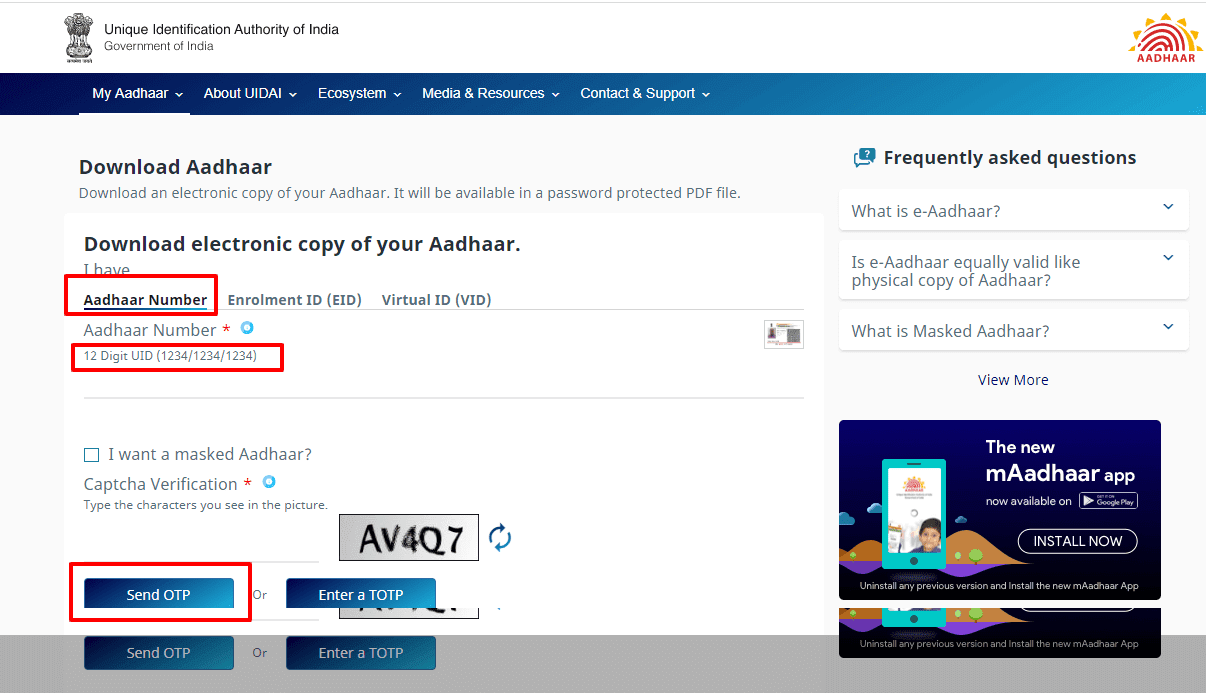
On the homepage, find the “My Aadhaar” section and click on the “Download Aadhaar” option.
You need to provide one of the following:
If you don’t remember your Aadhaar number, you can retrieve it using your registered mobile number.
You will see an option to download a “Masked Aadhaar.” If you select this, the first eight digits of your Aadhaar number will be hidden for security. Otherwise, you can download the regular version.
Click on “Send OTP.” You will receive a one-time password (OTP) on your registered mobile number. Enter this OTP in the given box to verify your identity.
Once your OTP is verified, you will see a “Download” button. Click on it to save your Aadhaar PDF file to your device.
The downloaded Aadhaar file is password-protected. The password is the first four letters of your name (in CAPITAL letters) followed by your birth year. For example, if your name is Rajesh Kumar and you were born in 1990, your password will be RAJE1990.
If you have lost or forgotten your Aadhaar number, don’t worry! You can retrieve it easily by following these steps:
Once you have your Aadhaar number, you can go ahead and download your virtual Aadhaar as explained earlier.
Now that you have your virtual Aadhaar, here are some ways to use it effectively:
If you prefer a durable plastic Aadhaar card, you can order a PVC Aadhaar card online. The PVC card is waterproof, has a QR code for verification, and looks just like a regular ID card.
To keep your Aadhaar secure, follow these tips:
Virtual Aadhaar is a simple yet powerful tool that makes life easier. Whether you need it for online verification or as a backup for your physical Aadhaar, it is always a good idea to download it and keep it handy. Go ahead and get your virtual Aadhaar today!


